
Delete App Account
Delete Your STIL Account
You can permanently delete your STIL account and all associated data directly from the app.
How to delete your account
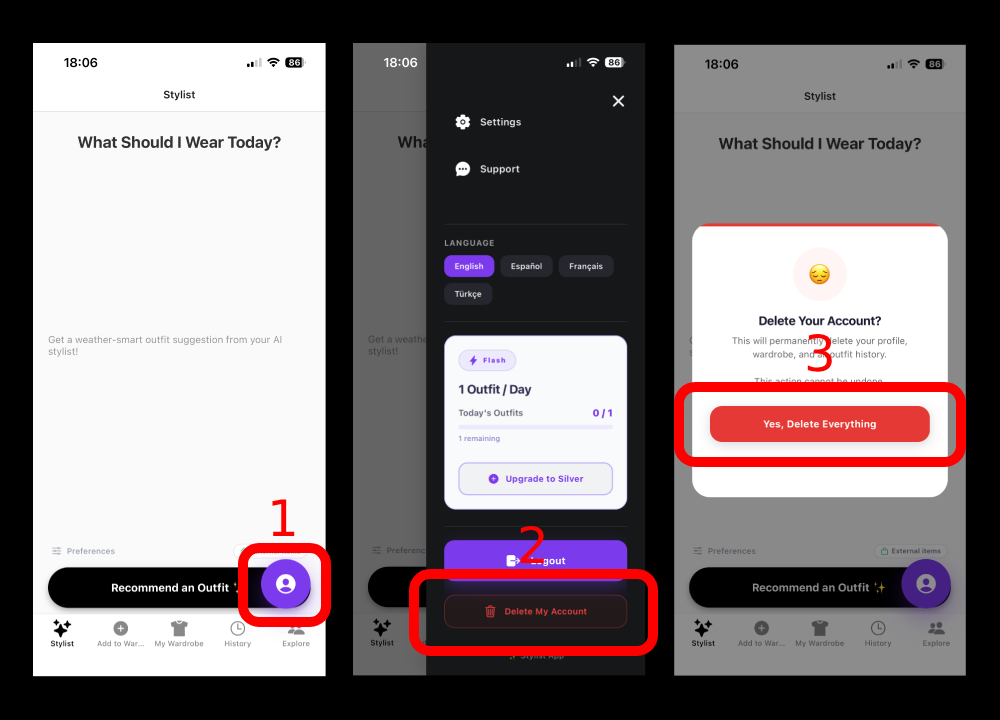
- Open the STIL app on your device.
- Tap the profile icon in the bottom-right corner to open the sidebar.
- Scroll down and tap Delete Account.
- Confirm the deletion in the dialog that appears.
What gets deleted
- Your profile and account information
- All wardrobe items and uploaded clothing images
- All outfit recommendations and history
- All social posts and activity
- Your authentication credentials
Retention & exceptions
- Deletion is permanent and cannot be undone.
- All data is deleted immediately upon confirmation.
- No data is retained after deletion.
- Active subscriptions must be cancelled separately via the App Store or Google Play.
If you have any issues, contact us at stilaistyler@gmail.com.